Prompt library

Shoe ad prompts that put the real shoe on real ground

A good shoe ad prompt keeps the camera at the angle of your reference photo, puts the shoe on the ground it was made for and crops people at the knee. Here are four prompts with the images they made, for two fictional brands: the PACER running shoe and the FERNHOLT chelsea boot, which we built from text to show the trade-off.

4 promptsSeedream 5 Flash editSeedream 5 Flash

The prompts

Each prompt exactly as it was typed, with the image it made. To reuse one, swap the product description and the scene for your own and attach your real product photo.

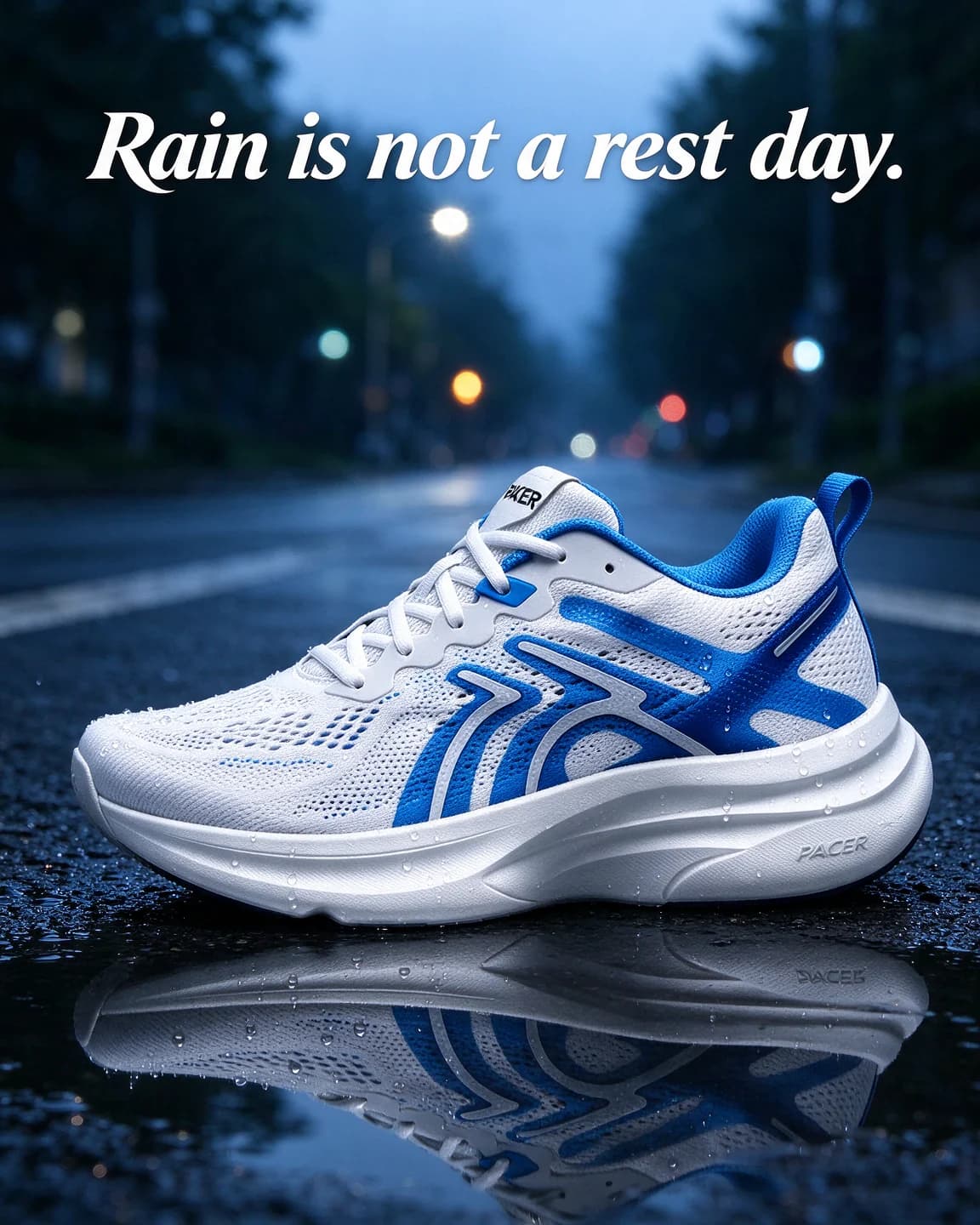
  1. A white and electric-blue PACER running shoe in side view on wet asphalt with its reflection in a puddle, headline Rain is not a rest day.

    Prompt 1

    Seedream 5 Flash edit4:5, product photo as reference

    Keep exactly the same white and electric-blue running shoe with the word "PACER" on its tongue and on the side of its white sole from the reference image, identical shape, colours, label text and logo, completely unchanged and clearly the hero of the image. A single shoe in a side view, the same angle as the reference, resting on wet dark asphalt at the edge of a road after rain, with a shallow puddle in front of it reflecting the shoe and small water droplets beading on the mesh. Cool early-morning light with a soft blue tint, wet street lights blurred far behind. Low camera at ground level with a 50mm lens, the shoe sharp across the lower half of the frame and its reflection clear in the puddle. Bold italic white headline at the top: "Rain is not a rest day." Portrait 4:5.

    We asked for the same side view as the reference on purpose. The packshot never shows the outsole, so a prompt that tips the shoe up makes the model invent a tread you don't sell.

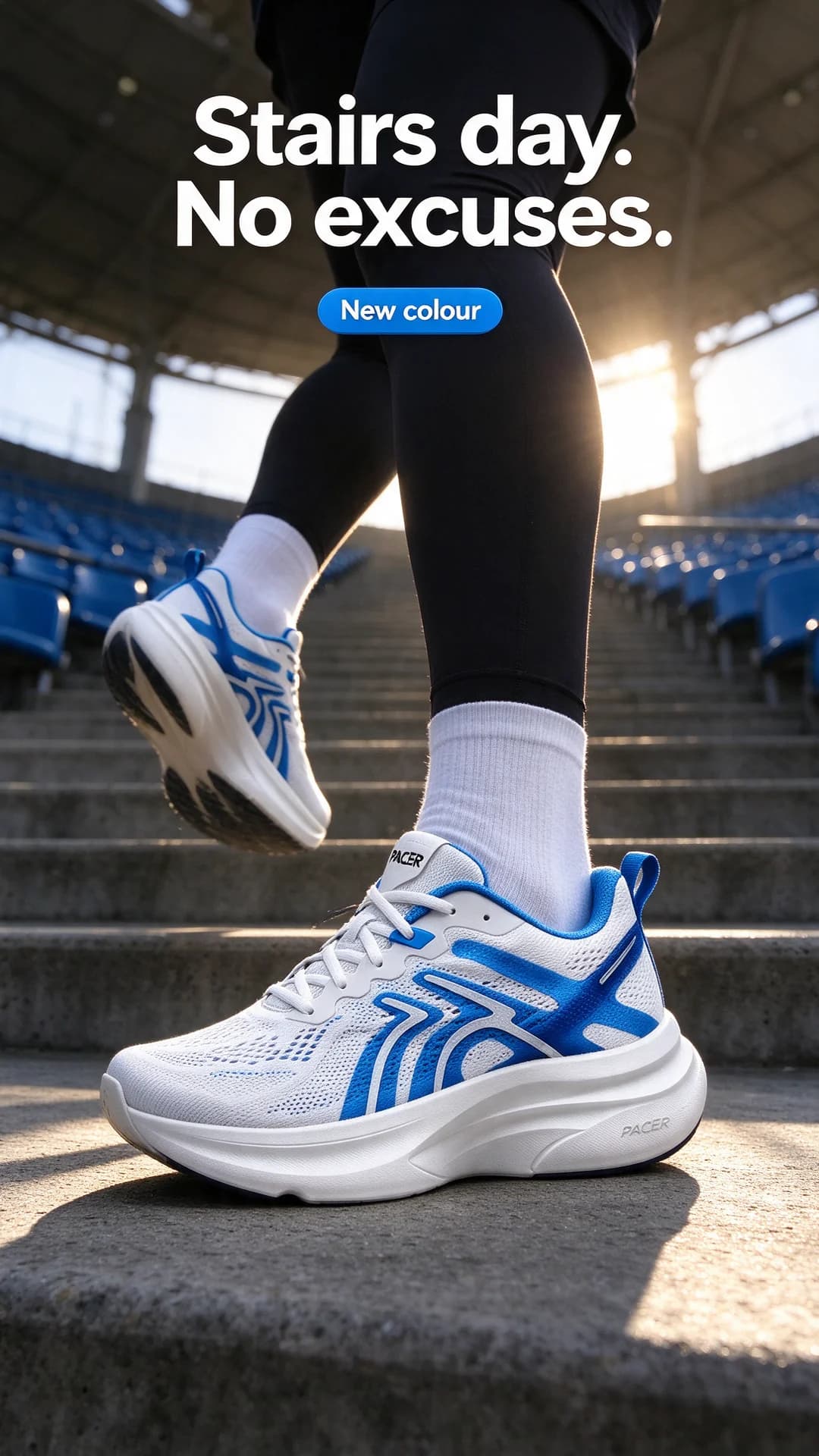
  2. A runner's legs from the knee down in a pair of PACER running shoes charging up concrete stadium steps in morning sun, headline Stairs day. No excuses. and a New colour sticker

    Prompt 2

    Seedream 5 Flash edit9:16, product photo as reference

    Keep exactly the same white and electric-blue running shoe with the word "PACER" on its tongue and on the side of its white sole from the reference image, identical shape, colours, label text and logo, completely unchanged and clearly the hero of the image. A runner's legs, seen from the knee down, wearing a matching pair of the shoes and charging up grey concrete stadium steps, one foot planted on a step and the other lifting off, black running tights and plain white socks. Bright morning sun from behind casting long shadows down the steps, empty blue seats blurred at the edges. Low camera at step level with a 35mm lens and a fast shutter, the planted shoe sharp in the lower middle of the frame. Bold white condensed headline near the top: "Stairs day. No excuses." A small electric-blue pill-shaped sticker with white text: "New colour". Vertical 9:16.

    The reference shows one shoe, so the model has to build the other foot by mirroring it. Check that both shoes match, including where the logo and the blue overlays sit, before you use a shot like this.

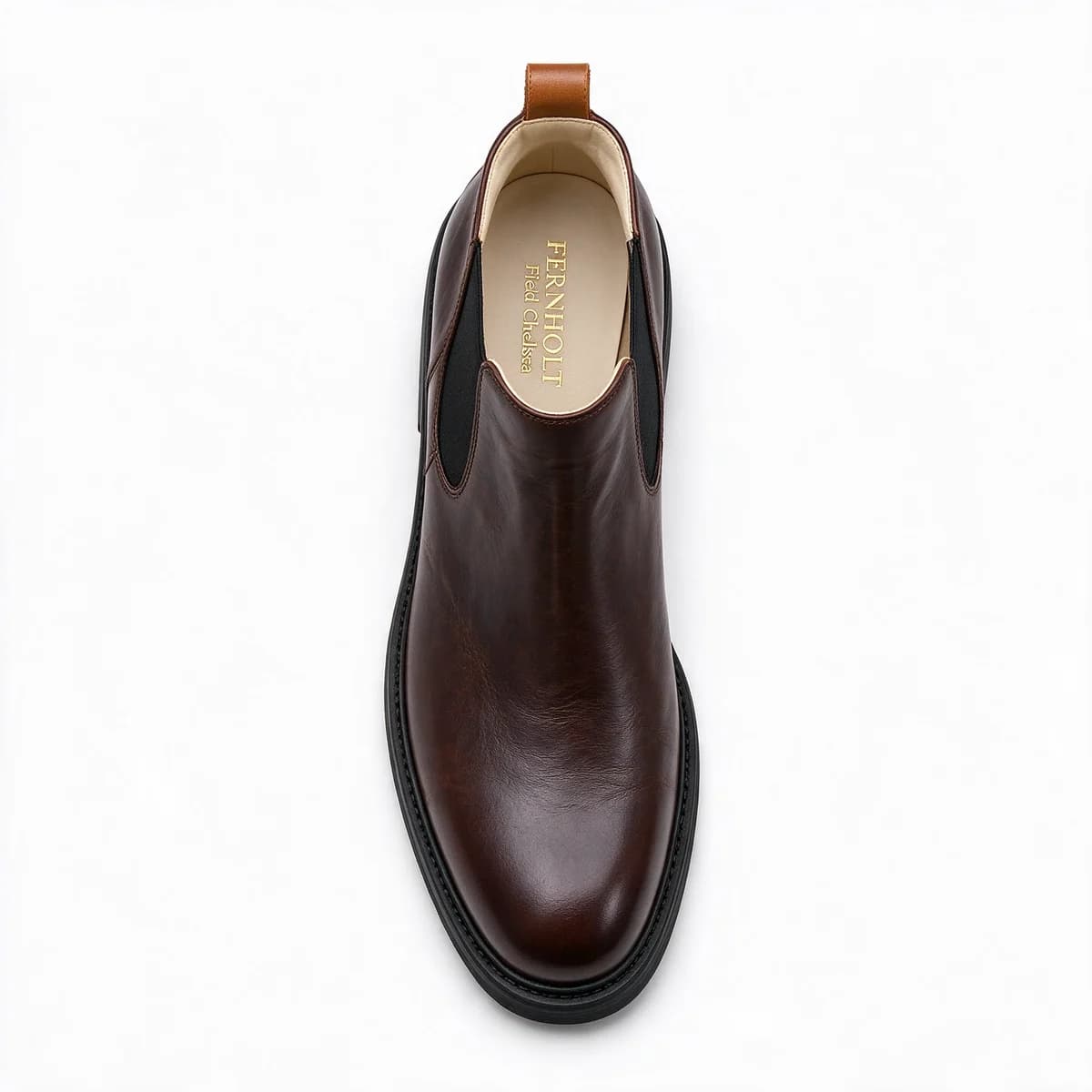
  3. Studio packshot of a dark brown waxed leather FERNHOLT Field Chelsea boot with black elastic sides and a chunky black sole on a white background

    Prompt 3

    Seedream 5 Flash1:1, text only

    E-commerce studio packshot of a single dark brown waxed leather chelsea boot with black elastic side panels, a tan leather pull tab at the heel and a chunky black rubber sole, with "FERNHOLT" and "Field Chelsea" printed in gold on the cream insole. The boot stands in a three-quarter view seen from slightly above, so the insole print is readable. Centred on a seamless pure white background with a soft natural contact shadow, even soft studio light, sharp focus. No other objects, no props, no people, no headline or text of any kind except what is printed on the product itself. Photorealistic high-end product photography, square.

    We built this boot from words alone. The waxed leather and the elastic look convincing, but nobody sells this boot, and the next text-only run would draw a slightly different one, so with your own range you photograph the real pair instead.

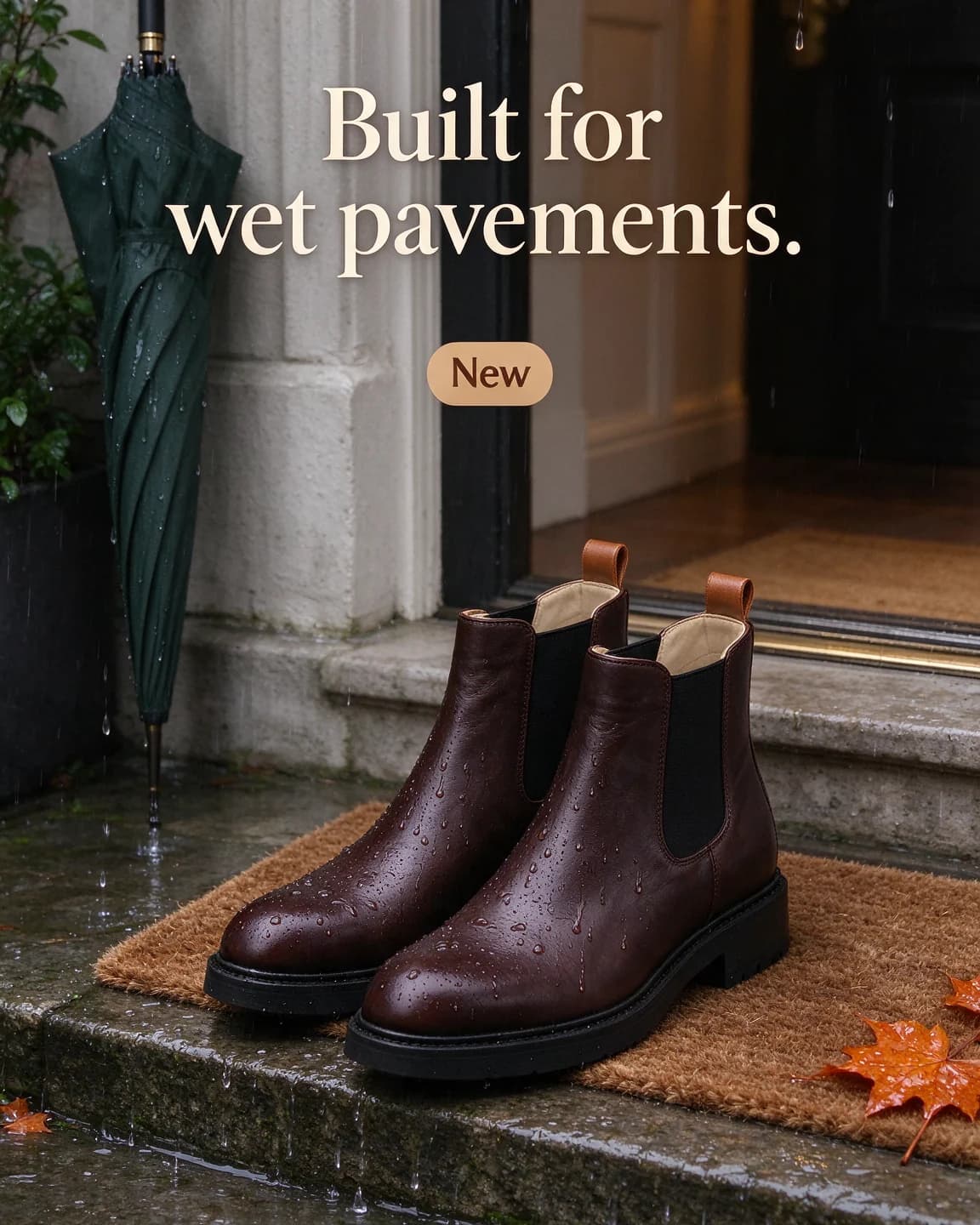
  4. A pair of brown FERNHOLT chelsea boots on a doormat at a rainy front door beside a dripping green umbrella and wet autumn leaves, headline Built for wet pavements. and a New sticker

    Prompt 4

    Seedream 5 Flash edit4:5, product photo as reference

    Keep exactly the same dark brown waxed leather chelsea boot with black elastic side panels, a tan pull tab and a chunky black sole, with "FERNHOLT" and "Field Chelsea" printed in gold on the cream insole, from the reference image, identical shape, colours, label text and logo, completely unchanged and clearly the hero of the image. A matching pair of the boots stands on a coir doormat at a front door with rain on the step, a dripping dark green umbrella leaning against the wall and a few wet orange autumn leaves on the stone. Soft grey overcast daylight with a warm glow from the hallway behind, water droplets beading on the waxed leather. Three-quarter view from slightly above at knee height with a 40mm lens, the boots in the lower centre with clear space above them. Warm white serif headline at the top: "Built for wet pavements." A small tan rounded sticker with dark brown text: "New". Portrait 4:5.

    Rain beading on waxed leather shows the material doing its job, which says more than a spec line. Keep any weather claim to what your leather and seams really handle.

Make it your product

  1. 1

    Shoot a side view and a top view

    The outer side of the shoe is the classic packshot angle. Add a photo from above if you want top-down or doorstep scenes, so the model always has the angle it needs.

  2. 2

    Describe the upper, sole and logo

    Rewrite the keep sentence with your colours, your materials and where your brand name sits, for example on the tongue, the heel tab or the insole.

  3. 3

    Pick a ground and a moment

    Swap the road for wherever your customer wears the shoe: a court, an office floor, a wedding stage, a trail, a school corridor. The eight ground lines on this page give you a head start.

  4. 4

    Check the pair

    When the shot needs both shoes, compare the output with your real left and right, since the model only ever saw one of them.

Prompt tips

  • Match the camera angle to your reference. A side-view packshot wants a side-view scene, so the model never has to guess at hidden parts.
  • Write "a matching pair" when you want two shoes, then check that left and right really mirror each other.
  • Crop people at the knee or the ankle. Legs in motion sell the use, and the shoe stays the subject.
  • Name the ground, such as wet asphalt, a gym floor, stadium steps or cobbles. The surface tells the viewer what the shoe is for.
  • Ask for one material detail up close, such as droplets on mesh or creases in leather, to show how the shoe is made.
  • Write the headline about the use, not the tech. "Rain is not a rest day" lands faster than the name of a foam.

Writing a shoe prompt that sells the walk

People buy shoes for the places they will wear them. A shoe prompt should therefore lead with the ground and the moment: a wet road at six in the morning, stadium stairs, a front door in October rain. The shoe itself is already in the reference photo, so the prompt only has to put it somewhere believable and say how the light falls on it.

Every prompt above follows the same order: the keep sentence, the scene and the ground, the light, the camera height and lens, then the headline in quotes. Camera height matters more for shoes than for most products. A camera at ground level makes a running shoe look fast and its sole look substantial. A camera at knee height looking down suits boots and loafers by a door or under a desk.

Angles only shoes have

  • The surface test. Rain, mud, gravel or a polished floor, chosen to match what the shoe promises.
  • The stride. Legs from the knee down, mid-step, with a fast shutter.
  • The doorstep. The pair waiting by the door, which turns the shoes into part of a daily routine.
  • The material close-up. Mesh, suede, waxed leather or stitching, shot tight.

Eight grounds that say what the shoe is for

The ground does half the selling in a shoe ad. Use any line below as the scene sentence, and keep the camera line after it close to the angle of your reference.

  • Court shoe. "The shoe rests on the painted line of an indoor court, polished maple floor, light falling from high windows."
  • Trail shoe. "The shoe stands on a damp forest trail among pine needles, dappled morning light, a little mud on the edge of the sole only."
  • Gym trainer. "The shoe rests on a black rubber gym floor beside a plain iron kettlebell with no markings, hard light from above."
  • Office shoe. "A matching pair sits under a desk on grey carpet beside a leather laptop bag with no logo, in soft daylight."
  • School shoe. "A small matching pair stands by a school bag at the foot of a wooden staircase in early morning light."
  • Festive pair. "A matching pair stands at the edge of a floor scattered with marigold petals, warm string lights blurred behind."
  • Sandal. "A matching pair stands on warm wooden boards beside a rolled beach towel, hard afternoon sun and crisp shadows."
  • Unboxing. "The shoe sits half out of a plain kraft shoebox with the tissue paper folded back, seen from above."

Every panel has to stay put

A trainer has many panels, overlays and stitch lines, and shoppers notice when one moves. Text-only models redraw all of them, which is why our third prompt produced a whole new boot. An edit model works from your photo, so the panels, the colours and the logo position start out correct. It can still only copy what it sees, and the two PACER prompts show both sides of that. The road shot asks for the same side view as the reference, so the model copies rather than invents. The stair shot needs a second shoe the reference never showed, which makes it the image to check hardest.

A quick cost check

Here is a worked example. Say a studio half-day for one new colourway costs $206 and gives you 20 finished images. That is $10 an image before retouching, and every new scene means another booking. Spend the studio money on one excellent packshot instead and run the scenes from it, and each extra image costs one generation plus your time to review it. In BulkAds that generation is 2 credits per image ad. Our guide to the cost per ad creative works through the sums for a whole test.

How BulkAds handles shoe ads for you

BulkAds skips the prompt writing. When you add your store, the brand kit collects your shoes, their photos and the claims on your product pages. Pick a style, choose up to 12 ads and the size, and each ad in the batch is built around your real packshot with its own angle, headline and copy, from a rainy commute to a bold colour block. A pre-flight check compares the shoe in each ad with your photo and checks the on-image spelling, so a drifted logo or a redrawn sole is flagged before launch. The ones you keep go to Meta through the bulk ad launcher, paused, or into an Autopilot test that stops the ones that don't sell. For finished ads, see our footwear ad examples.

Questions people ask

Why did the AI change my shoe's sole?

Usually because the prompt asked for an angle the reference didn't show. The model has to invent anything it can't see, so match the camera angle to your photo or add a second reference taken from that angle.

Can I get a pair of shoes from a photo of one?

Yes, ask for a matching pair. The model mirrors the shoe for the other foot, which mostly works, but check the logo side and the colour blocking on both before you use it.

Should shoe ads show feet and legs?

Legs from the knee down are a good way to show the shoe in use without a face. Keep socks and clothing plain so nothing competes with the shoe.

What headline works on a shoe image?

Name the moment or the ground rather than the technology. A line like Rain is not a rest day tells a shopper what the shoe is for at a glance.

Does BulkAds work for a whole range of shoes?

Yes. Each shoe in your brand kit keeps its own photo, so you can make a batch for each style or colourway, each one built and checked against its own packshot.

Keep going

Every image on this page was made with AI from the prompt beside it. Model names are the ones BulkAds used, and results vary from run to run.

BulkAds AI is an independent product and is not affiliated with, endorsed or sponsored by Meta Platforms, Inc. Facebook and Instagram are trademarks of Meta Platforms, Inc.

Your next fifty ads are one link away.

Paste your website, meet your brand kit and see your first batch in minutes. 7 days for $9.99 — cancel anytime.

yourbrand.comMake my ads

See pricingExplore featuresBrowse the library