Prompt library

Toy ad prompts that show play, not just the box

Toy ad prompts work best when they show the toy in the middle of play, from a child's eye level, with small hands but no faces and a line written for the adult who pays. Here are four prompts for a fictional toy brand, OTTO & PIP, run with Seedream 5 Flash edit on a packshot of each toy, with notes on what each gets right and what to swap.

4 promptsSeedream 5 Flash edit

The prompts

Each prompt exactly as it was typed, with the image it made. The parts in the highlighter are the ones to swap for your own product.

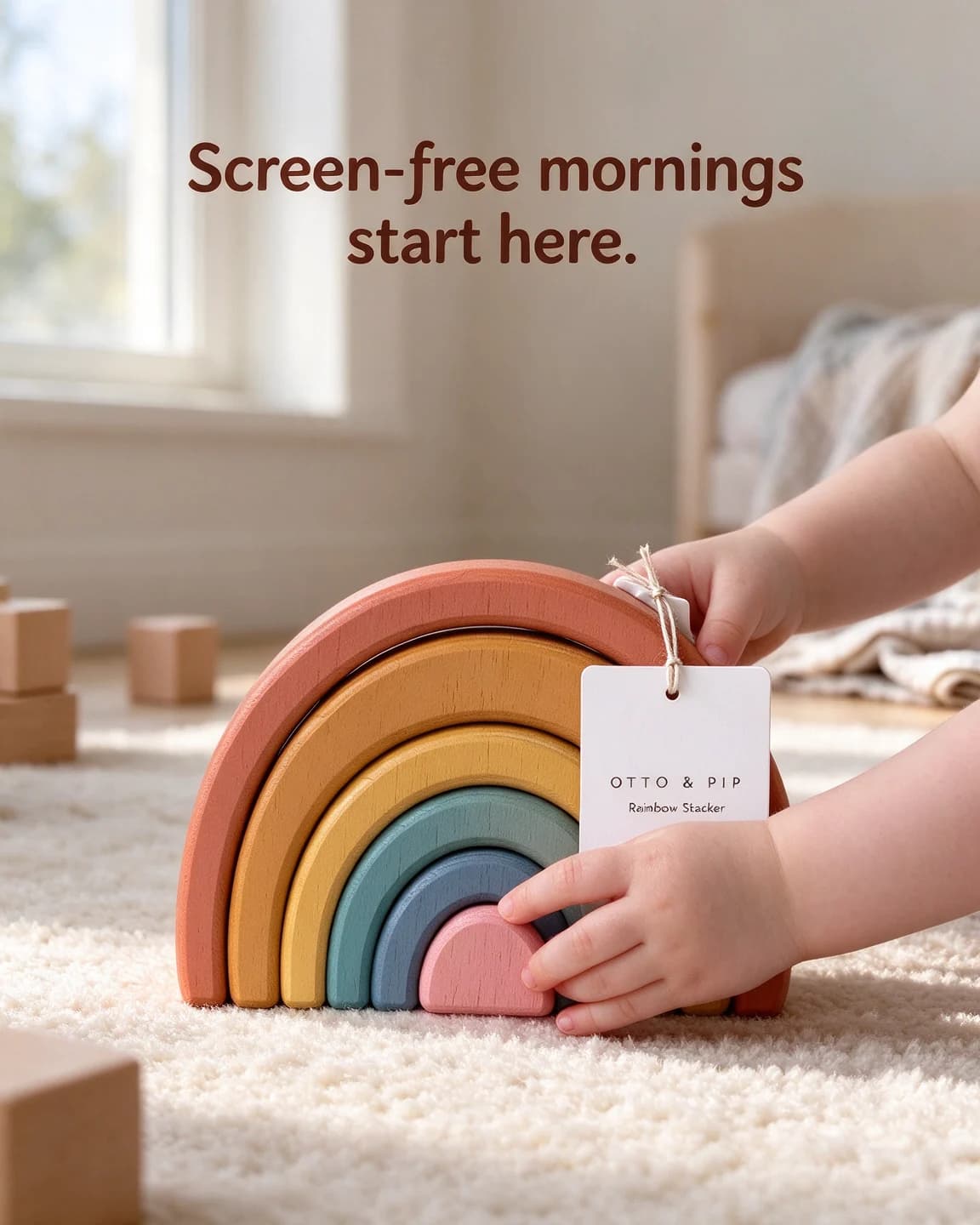
  1. AI-made ad: an OTTO & PIP wooden rainbow stacker on a playroom rug, a toddler's hands lifting an arch

    Prompt 1

    Seedream 5 Flash edit4:5, product photo as reference

    Keep exactly the same [wooden rainbow stacker of seven muted painted arches with a white "OTTO & PIP" tag] from the reference image, identical shape, colours, label text and logo, completely unchanged and clearly the hero of the image. The stacker stands on a soft cream wool rug in a sunlit playroom, and a toddler's small hands reach in from the right to lift the smallest arch, hands and forearms only. A few wooden blocks and a folded muslin blanket lie softly blurred in the background. Gentle morning window light from the left. Low camera at a toddler's eye level with a 50mm lens, shallow depth of field, the stacker in the lower centre with clear space at the top. Rounded friendly sans-serif headline at the top in dark brown: "Screen-free mornings start here." No faces, no other brands or logos. Portrait 4:5.

    The camera sits at a toddler's eye level, so a small wooden toy fills the frame the way it would for a child. The hands reaching in from the side show play without putting a face in the picture.

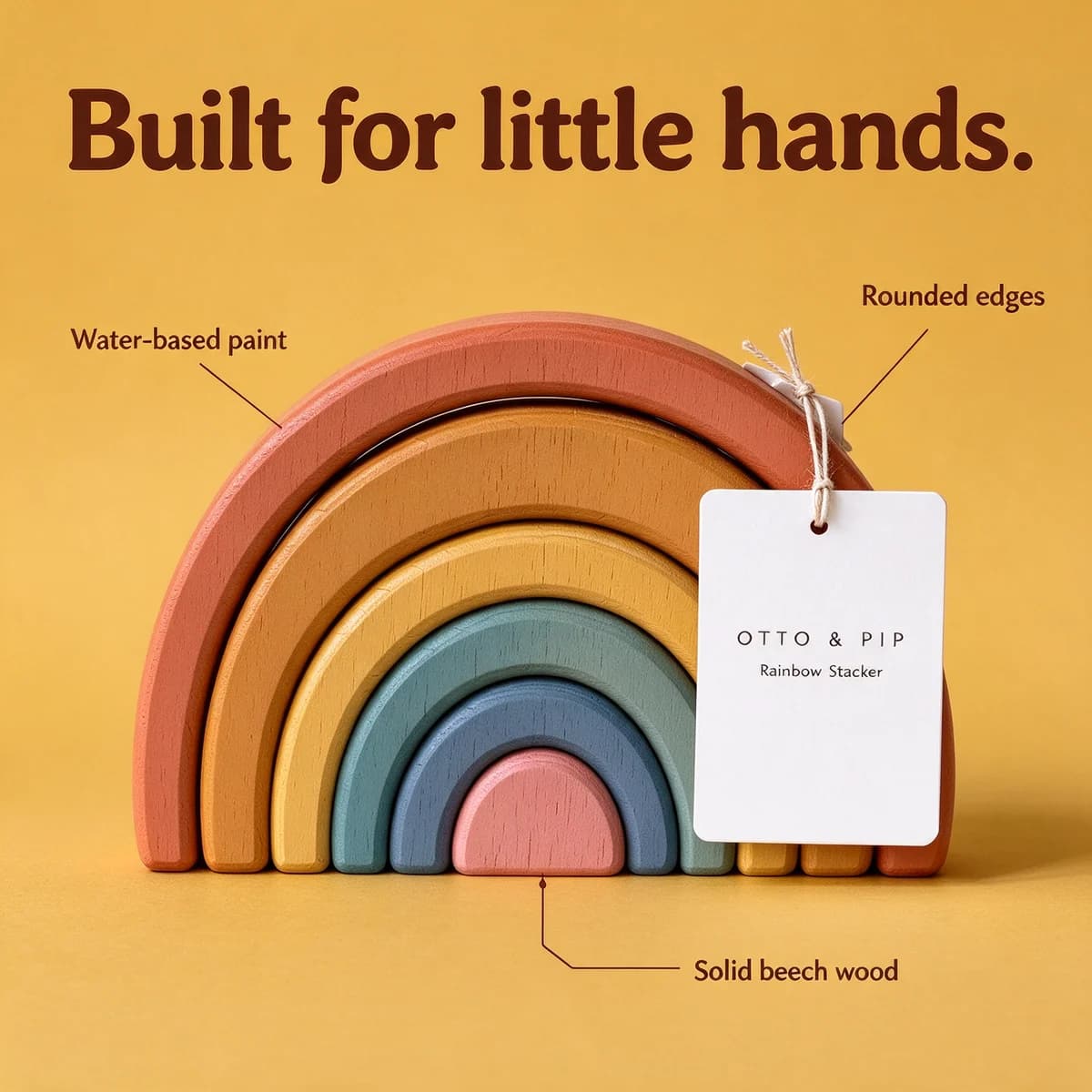
  2. AI-made ad: an OTTO & PIP rainbow stacker on mustard yellow with three feature callouts

    Prompt 2

    Seedream 5 Flash edit1:1, product photo as reference

    Keep exactly the same [wooden rainbow stacker of seven muted painted arches with a white "OTTO & PIP" tag] from the reference image, identical shape, colours, label text and logo, completely unchanged and clearly the hero of the image. The stacker stands centred on a flat warm mustard-yellow background with a soft shadow beneath it. Clean, even studio light, straight-on camera at the height of the middle arch, the stacker filling the lower two thirds. Three thin dark brown leader lines point to parts of the stacker with small dark brown labels: "Water-based paint", "Rounded edges", "Solid beech wood". Bold rounded headline at the top in dark brown: "Built for little hands." Minimal feature callout ad, square 1:1.

    Leader lines turn a plain packshot into three reasons to buy, and each label is short enough to render cleanly. Every label is also a claim, so only use material and safety lines your maker can confirm in writing.

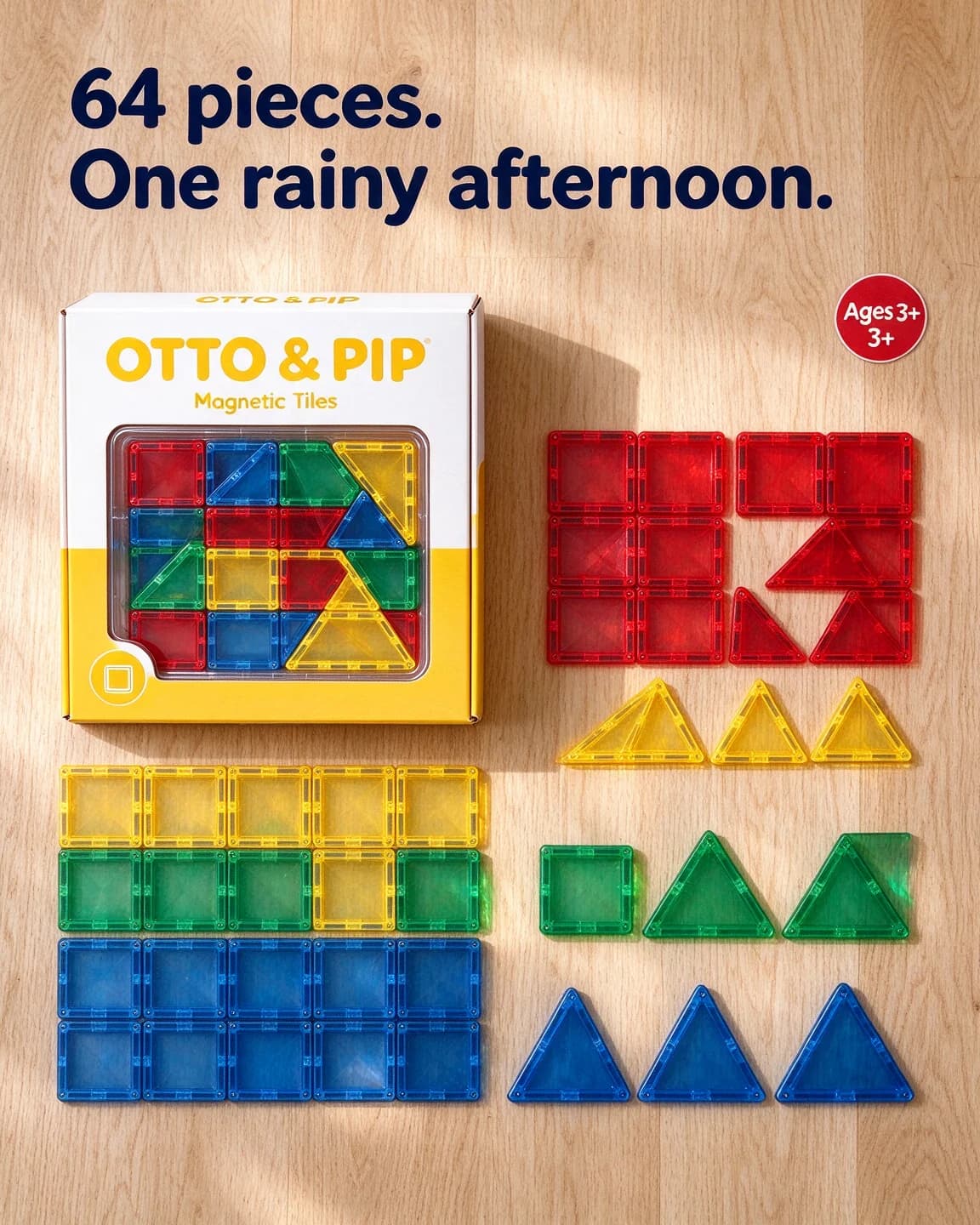
  3. AI-made ad: an OTTO & PIP magnetic tiles box with tiles sorted by colour in a top-down knolling layout

    Prompt 3

    Seedream 5 Flash edit4:5, product photo as reference

    Keep exactly the same [white and yellow "OTTO & PIP" Magnetic Tiles box with a clear window] from the reference image, identical shape, colours, label text and logo, completely unchanged and clearly the hero of the image. Top-down knolling flat lay on a light oak floor: the box lies in the top left area, and translucent magnetic tiles are laid out in neat rows sorted by colour and shape, red, yellow, green and blue squares and triangles, with even gaps between them. Bright soft daylight from above, coloured light passing through the tiles onto the wood. Straight overhead camera, everything square to the frame, a clear strip of floor at the top. Bold rounded headline at the top in dark navy: "64 pieces. One rainy afternoon." A small round red sticker with white text: "Ages 3+". Playful, tidy toy ad, portrait 4:5.

    Knolling shows the whole set at once, and naming light through the tiles keeps clear plastic from looking grey. Don't expect the model to lay out exactly 64 tiles, so the count lives in the headline, not the picture.

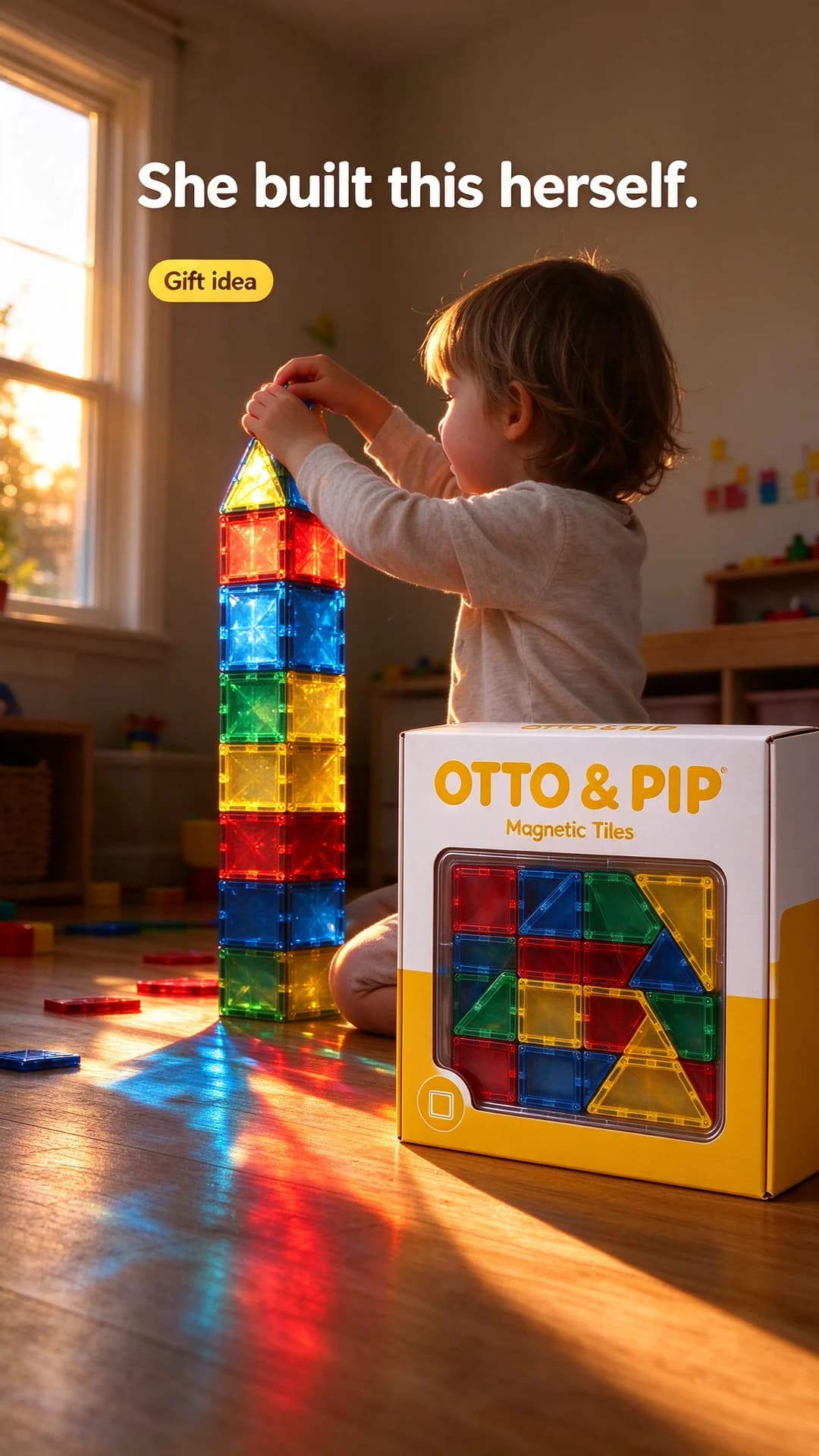
  4. AI-made Story ad: a tall magnetic tile tower in low sun, a child seen from behind, the OTTO & PIP box in front

    Prompt 4

    Seedream 5 Flash edit9:16, product photo as reference

    Keep exactly the same [white and yellow "OTTO & PIP" Magnetic Tiles box with a clear window] from the reference image, identical shape, colours, label text and logo, completely unchanged and clearly the hero of the image. The box stands on a sunlit wooden floor in the lower right foreground, and behind it a tall tower of translucent magnetic tiles glows in the late-afternoon sun, throwing red, blue and yellow coloured shadows across the floor. A young child kneels beside the tower, seen from behind, placing the last tile on top. Warm low sunlight from a window on the left. Low camera with a 35mm lens, the tower filling the upper middle of the frame, the bottom fifth kept free of text. Bold white rounded headline near the top: "She built this herself." A small yellow pill sticker with dark text: "Gift idea". No faces, no other brands or logos. Full-screen vertical Story, 9:16.

    A finished build shows parents what the box turns into, and a child seen from behind carries the pride without a face. The coloured shadows come from naming low sun from one side, so keep that line if you change the room.

Make it your product

  1. 1

    Describe your toy by its parts

    Replace the highlighted part with your toy in countable terms: how many pieces, which colours, which material, and the exact words on the tag or box. Upload a packshot that shows every piece.

  2. 2

    Choose the play moment

    Building sets suit a finished build, stackers suit a hand mid-stack, puzzles suit the last piece going in and plush toys suit a bedtime cuddle in lamp light.

  3. 3

    Keep children out of focus or from behind

    Use hands, forearms or a child kneeling with their back to the camera. If the toy is for babies, a parent's hands can do the same job.

  4. 4

    Swap the headline and the sticker

    Write two to seven words for the parent or gift-giver. Use an age sticker only when the age grade is printed on your packaging.

Prompt tips

  • Put the camera low. A child's eye level makes the toy look big and the scene feel like play rather than a catalogue page.
  • Show hands, not faces. Small hands reaching in tell the story and keep every child in the picture unidentifiable.
  • Show the toy in use or just finished, such as a stacker mid-stack or a tower with one tile to go. A toy sitting alone reads as a listing.
  • Write the headline to the adult who pays: screen time, rainy afternoons, tidy-up, a gift that gets used.
  • Name materials and finishes, such as painted beech, translucent plastic or felt, so the model doesn't swap them for shiny generic plastic.
  • Keep age grades and safety lines to what is printed on your real box.

How to write a toy ad prompt

Start with the camera, because it decides more in toy ads than in most categories. Shoot a toy from adult height and it looks like a listing. Drop the camera to the floor, about level with a small child's eyes, and the same toy looks big, inviting and part of a game. Every prompt below names either a low camera or a straight overhead view, never the in-between.

After the camera, decide how much mess the picture can take. There are two honest options:

  1. Tidy. A knolling layout, with every piece sorted by colour and square to the frame, shows what comes in the box. It suits building sets, puzzles and anything sold by piece count.
  2. Lived in. A rug, a few stray blocks and a half-finished build show the toy being played with. It suits open-ended toys, where the selling point is how long a child stays busy.

Then write the line for the adult. Children ask for toys, but parents, grandparents and gift-givers pay, and they think about screen time, rainy afternoons, mess, how sturdy it is and whether it will still be played with next month.

Toys get checked against the box

Parents compare the ad with what they unpack. Show seven arches and ship six, or show teal and ship green, and they notice straight away. Text-only image models are loose with exactly these details. They add pieces, round off shapes, swap matte paint for shiny plastic and sometimes give a plush toy a face it doesn't have.

The prompts here start from a packshot of each toy and tell the model to keep it unchanged, so the colours and shapes come from the photo, not from the model's idea of a stacker. Counting is still weak. If your headline says 64 pieces, don't expect to count 64 tiles in the picture, and don't let the image suggest more than the box holds.

Children in toy ads

None of the prompts shows a child's face. Small hands reaching in, a child kneeling with their back to the camera or a finished build with nobody in frame all tell the story of play. That rule avoids realistic AI-made children altogether, which is the simplest line to hold in a category sold to families, and a back or a pair of hands leaves the model less to get wrong than a face.

If you do want real children in your ads, that is a job for a real shoot with permission from their parents, not for a prompt.

How BulkAds makes toy ads without prompting

In BulkAds you start from the product, not the prompt. Add your store and the brand kit collects your toys with their photos, prices and the proof points your site states. Pick a toy and a batch size, up to 12, and each ad takes its own angle, such as the toy in use on a playroom floor, a bold claim on a flat colour, an offer or a seasonal gift scene. You can steer the batch with a sentence such as "Christmas gifting, grandparents, wooden over plastic".

Before you see the batch, a pre-flight check compares every ad with your product photo for shape, label and colours, so a stacker that gained an arch gets flagged, and it checks the spelling of on-image text. Each image ad uses 2 credits. Ads launch to your own Meta ad account paused, so nothing runs until you approve it. For gift seasons, the Christmas ad ideas and the gift guide template pair well with these prompts, and the unboxing template suits toys that arrive in a good box.

Questions people ask

Can I show children in AI-made toy ads?

You can show them without faces: hands, backs and children seen from a distance. We keep to that on this page because it removes any doubt about whether a realistic child was generated or photographed, and it still shows the toy being played with.

Why did the AI add pieces to my toy?

Text-only models guess at shapes and counts. Start from a photo of your real toy, ask the model to keep it unchanged and reject any result with extra or missing parts. Counts are still weak, so put piece numbers in the headline rather than relying on the picture.

Should a toy ad talk to the child or the parent?

To the adult. They are the ones who see the ad and pay, so lead with what they care about: time away from screens, a toy that lasts, easy tidy-up and a gift that actually gets used.

What is a knolling shot?

A top-down layout where every piece is arranged in neat rows at right angles, sorted by colour or shape. For building sets and kits it shows everything in the box at a glance, which a box photo alone can't do.

Do these prompts work for plush toys?

Yes, with two changes. Describe the fabric, such as short pile, felt or knit, and say the toy has no face if it has none, because models like to add eyes. A bedtime scene in soft lamp light suits plush better than a bright playroom.

Keep going

Every image on this page was made with AI from the prompt beside it. Model names are the ones BulkAds used, and results vary from run to run.

BulkAds AI is an independent product and is not affiliated with, endorsed or sponsored by Meta Platforms, Inc. Facebook and Instagram are trademarks of Meta Platforms, Inc.

Your next fifty ads are one link away.

Paste your website, meet your brand kit and see your first batch in minutes. 7 days for $9.99 — cancel anytime.

yourbrand.comMake my ads

See pricingExplore featuresBrowse the library